Health Hue Hub · AI Scribe
An AI scribe that writes the visit note while you talk to the patient.
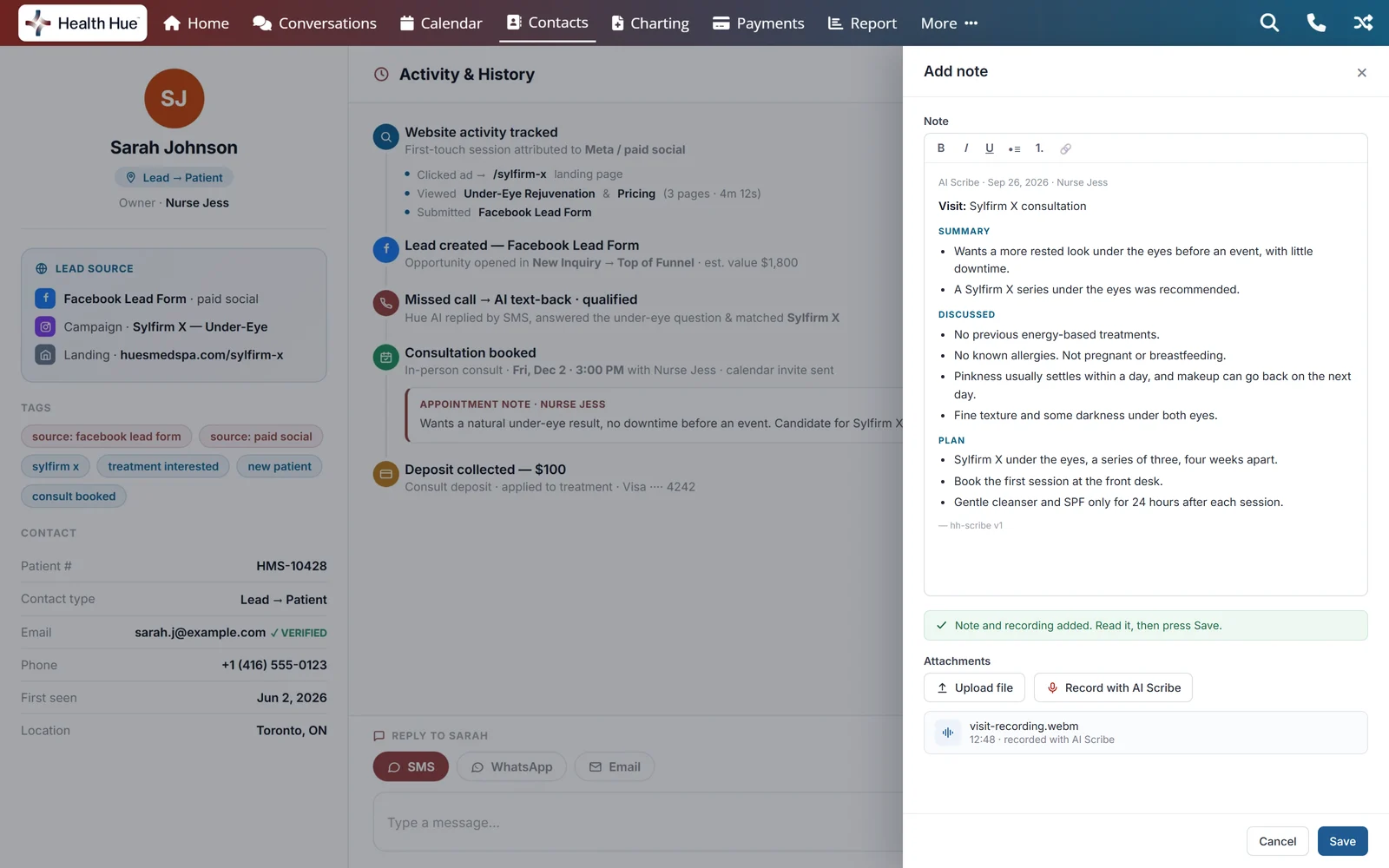
Press record in the patient’s note, have the visit, then press stop. The AI Scribe transcribes the conversation, then organizes it into a clinical note: the visit, a summary, what was discussed and the plan. It lands in the note box with the audio attached, ready for you to read, edit and save.
the patient’s note
to open
is saved
01 · Recording
Record from the note you already open.
Open the patient, open Notes and choose Add. Record with AI Scribe sits beside Upload file. Click it, allow the microphone once, and talk with your patient the way you always do. There is no second window to manage. Click again when the visit is over.
02 · The note
Organized into a clinical note, section by section.
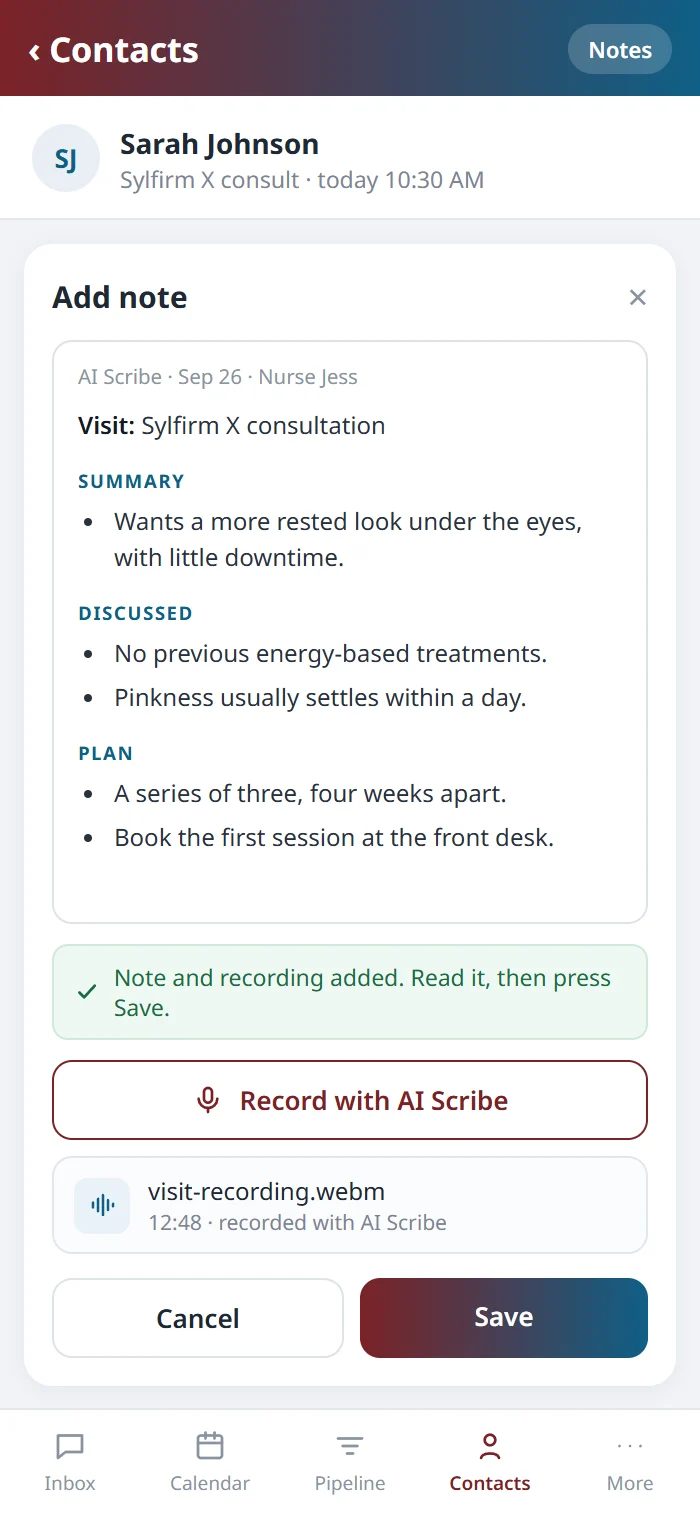
When you stop, the recording is transcribed and the AI Scribe sorts what was said into the clinical note format: the visit type, a short summary, every point discussed in the order it came up, and the plan that was agreed. Doses, areas and sides go in only as they were said, and any figure it can’t find in the recording is flagged unverified for you to check. Plans stay as plans, so nothing is charted as done unless it was said. The note appears in the same note box, with the audio attached underneath.
Visit: Sylfirm X consultation
Summary- Wants a more rested look under the eyes, with little downtime.
- No previous energy-based treatments.
- Pinkness usually settles within a day.
- 3 sessions, 4 weeks apart.unverified
- Book the first session at the front desk.
03 · Review and save
You read it, edit it and save it.
The draft is ordinary text, so you can change any line before it’s filed. Press Save and it joins the patient’s Notes, on their timeline and visible to your team, with the visit audio attached for when someone needs to check a detail. Close the drawer without saving and nothing is filed.
04 · With charting
Works with Medical Charting, on the same patient.
The AI Scribe is sold and priced on its own, and it works with Medical Charting. Once the visit note is saved to the patient’s Notes, Open charting takes you straight into that patient’s chart to record the treatment, the units and the lots. The spoken visit and the treatment record end up on one patient, with nothing copied between systems.
05 · Privacy
Patient audio stays in a private, encrypted store.
Audio and transcripts are encrypted and held in Health Hue’s own secure cloud, and each clinic’s visits are visible only to that clinic. The recording goes straight from your browser to that store. The AI Scribe runs as its own application, on its own infrastructure, separate from the rest of the Hub.
Secure, compliant, and clinic-ready
Every feature lives in a platform built for clinics from the ground up, with charting, consent, and payments native to the patient record.
PHIPA & HIPAA-aware
Patient data is encrypted and handled to Canadian health-privacy standards.
Consent & audit
Consents, signatures, and changes log to the record automatically.
Role-based access
Granular permissions keep charts and contact details on a need-to-know basis.
One source of truth
Scheduling, payments, messages, and records in one place. Nothing siloed.
Explore more of the Hub
The AI Scribe is one part of the Health Hue Hub, your AI-powered clinic operating system.
Telehealth
Video consults, recorded and transcribed.
Medical Charting
Chart on real photos, with units and lots.
Patient Records
Every patient in one complete profile.
Consent Forms
Every form in one link, signed before the visit.
Calendar & Scheduling
AI booking, reminders, and provider sync.
Conversations
One inbox for SMS, calls, web chat, and DMs.
FAQ
Questions about the AI Scribe.
Does it work with Medical Charting?
Yes. The AI Scribe is $0.08 per recorded minute, and it works with Medical Charting. After you save the note, Open charting takes you to the same patient’s chart to record the treatment.
Where is the AI Scribe in the Hub?
In the patient’s notes. Open the patient, open Notes and choose Add, and Record with AI Scribe sits beside Upload file. There’s no separate app to open or sign in to.
What does it record?
The conversation in the room, through the microphone on the computer you’re charting on. It’s made for in-person visits. Video consults have their own tool: Telehealth.
Can I change the note before it’s saved?
Yes. The draft arrives in the note box as ordinary text, so you can edit any line or delete it. Nothing is filed until you press Save.
Does it just transcribe the visit?
It transcribes the visit, then organizes it into a clinical note: the visit type, a summary, what was discussed and the plan. Figures it can’t find in the recording are flagged unverified for you to check.
What happens to the audio?
It’s attached to the saved note, so your team can play it back from the patient’s record. Recordings and transcripts are encrypted and held in Health Hue’s own secure cloud.
How is the AI Scribe priced?
$0.08 per recorded minute, rounded up to the minute, billed to your Hub account alongside the rest of your plan.